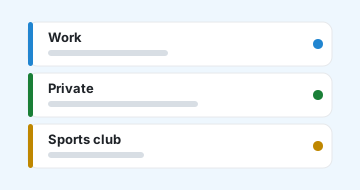
Buckets for every part of your life
Group tasks into the topics that belong together: Work, Private, your sports club, that other club, the kids' school. Each bucket keeps its world separate, so nothing bleeds together.

Each tool below uses your personal create-task endpoint. Click a tool to reveal how to set it up. The snippets already include your endpoint, token, and the bucket and status selected above.
Add this function to your ~/.bashrc or ~/.zshrc, then
reload your shell. It turns everything you type after todo into a task.
Then from any terminal:
todo Buy milk and eggs
Double quotes in the title are
escaped automatically. No extra tools required, just curl.
With the Alfred Powerpack you can add tasks from the Alfred bar.
todo, set Argument to Argument Required, and
give it a title like “Add a task”./bin/bash and with input as argv, then paste
the script below.Now type
todo Buy milk in Alfred to create the task.
iOS doesn't let a web app add itself to the share sheet, but the built-in Shortcuts app can. Build this once and “Add to meerato” shows up when you share from Safari, Mail, Notes, or any selected text on the phone.
#Bucket, !now or next week, before it saves.POST, add a header
Content-Type with the value application/json, set
Request Body to JSON, and add a single
Text field named title whose value is the
Provided Input from the previous step.The URL already contains your
token, so treat it like a password. Tasks land in your default bucket unless the title
names one. To pin the shortcut to a specific bucket or status instead, add
bucket_id and status as extra text fields in the JSON body,
using the values from the Defaults for created tasks pickers.
meerato is provided by RebelProject UG.
Contact: contact@meerato.com
The software is open source, the meerkat project: github.com/ribalba/meerkat.
By using this service you agree to use it lawfully and at your own risk. The service is provided "as is", without warranty. Please contact us with any questions about your data.
The server refused these changes, so they have been set aside instead of being retried forever. Fix the cause and retry, or discard them — discarding only stops them being sent; what they changed stays on this device until a reload replaces it with the server's copy.
We include your name in the email notifications we send to a task's watchers, so they know who made a change, for example "Alice changed the status to Done". You can change or remove it anytime in Settings.
Type your task as usual. Add any of these and meerato sets them up automatically:
#Bucket |
File it under an existing bucket by name, e.g. #Work or #Side project. |
@who@example.com |
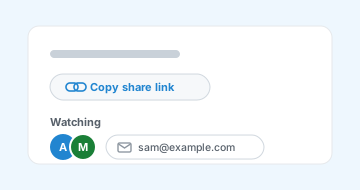
Add a watcher by email (they get an invite). Add several by repeating it. |
!status |
Set the status: !now, !backlog, !blocked or !done. |
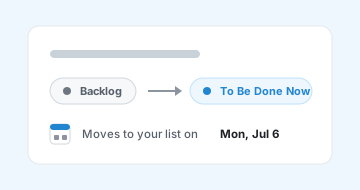
| a date at the end | Start the task in Backlog and automatically move it to Now on that day. |
tomorrow | The next day. |
in 3 days · in 2 weeks · in 1 month | Relative to today. |
next week | The coming Monday (weeks start on Monday). |
next month · next year | The 1st of next month · January 1st. |
monday … sunday | The next time that weekday comes around (also next friday). |
on 2026-07-15 | A specific date (YYYY-MM-DD). |
If an email isn't valid or a bucket name doesn't exist, that part stays in the task title untouched, nothing is lost.
Type to search across every task's title and notes. All conditions you give must match (filters and text are combined with AND).
The free text (anything that isn't a key:value filter) is treated as a
case-insensitive regular expression matched against the title and notes.
report | contains "report" anywhere |
^Buy | title/notes starting with "Buy" |
invoice|receipt | matches "invoice" or "receipt" |
\bbug\b | the whole word "bug" |
status:<value> |
Filter by status. Values: backlog (or open),
on_list (or todo), blocked, done.
Repeat to match any of several, e.g. status:blocked status:done. |
bucket:<name> |
Filter by bucket name (partial match), e.g. bucket:work.
Use quotes for names with spaces: bucket:"side project". |
status:done bucket:work meeting: done tasks in a "work" bucket whose
title or notes match meeting.
 meerato